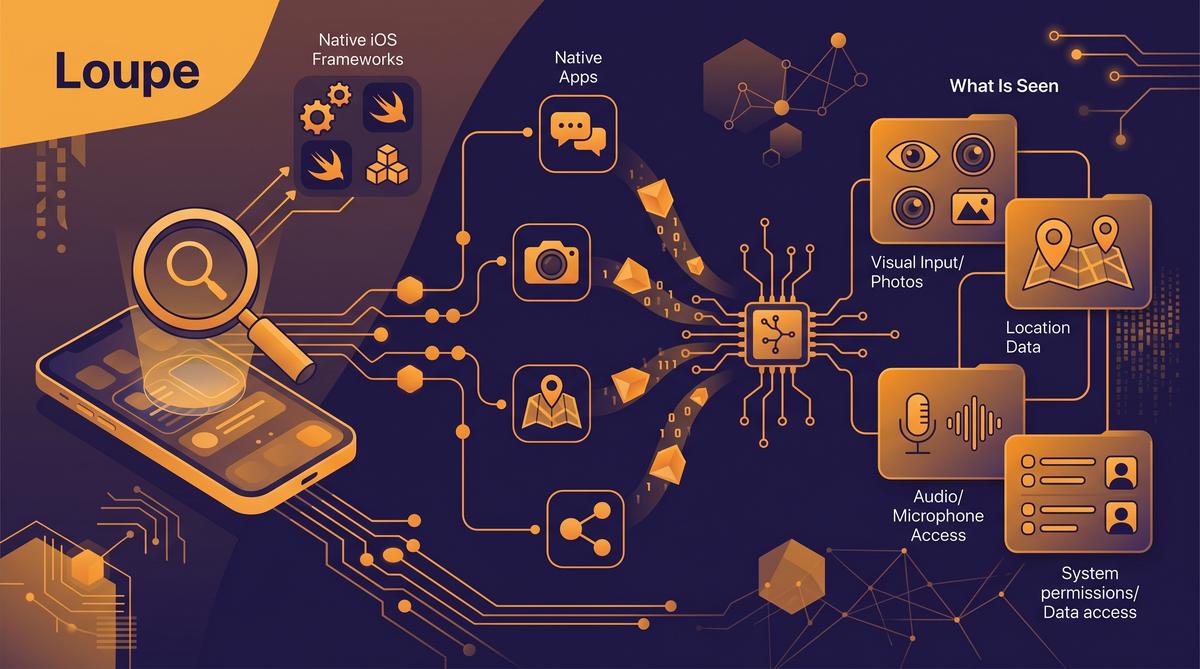
Apple is under investigation by Italian regulators over iCloud and iOS interoperability under the EU’s Digital Markets Act (Rootblog, 2026). At the same time, Apple quietly added a new tracking feature to the App Store that monitors how users interact with app listings (GSMManiak, 2026). Into this climate of scrutiny arrives Loupe — an iOS awareness tool that surfaces what native apps can actually see on your iPhone.
TL;DR: Loupe is an iOS awareness app that reveals the system APIs and device data points native apps can access. With Apple facing an Italian regulatory probe over iCloud and iOS interoperability under the Digital Markets Act (Rootblog, 2026), Loupe gives users a transparent view of what installed apps actually read from the device — from location and identifiers to sensor data and system preferences.
What Is Loupe and What Does It Reveal About iOS Apps?
Loupe is an iOS application designed to expose the system-level data that native apps can access on an iPhone or iPad. It functions as an inspection tool, surfacing the APIs and data points that apps routinely query — often without the user’s explicit awareness. The app provides a real-time view of what information is available to any native app running on the device.
The tool arrives at a moment of heightened regulatory pressure on Apple. Italian regulators launched an investigation into iCloud and iOS interoperability, examining whether Apple complies with the Digital Markets Act’s requirements for fair access to platform capabilities (Rootblog, 2026). This probe specifically targets how Apple handles cloud backups and whether third-party services can compete on equal terms.
Loupe addresses a gap that Apple’s own privacy controls leave open. While iOS displays permission prompts for camera, microphone, and location access, many system APIs operate without any user-facing prompt. Apps can read device identifiers, battery state, storage capacity, and network information silently. Loupe makes these hidden data points visible.
This matters more than you might think.
The app catalogues each accessible data category and shows which system framework provides it. Users can browse through the list of APIs and understand what a typical native app could theoretically query during normal operation.
How Does Loupe Inspect Native iOS App Behavior?
Loupe works by querying the same iOS system frameworks that native apps use to read device information. It does not jailbreak the device or bypass Apple’s sandbox. Instead, it calls publicly available APIs from Apple’s UIKit, Foundation, Core Location, and other system frameworks to demonstrate what data is retrievable through standard, App Store-approved methods.
The inspection process mirrors what a typical app does at launch. When you install a new app, it often collects device information during onboarding — model, OS version, language, timezone. Loupe performs these same queries and presents the results in a readable format, showing exactly what a developer receives.
Here is how Loupe categorizes the inspection:
- Device hardware identifiers — model name, processor type, screen resolution
- System configuration — iOS version, locale, timezone, carrier name
- Network state — Wi-Fi status, cellular type, IP address visibility
- Sensor availability — accelerometer, gyroscope, magnetometer presence
- Storage and memory — total capacity, available space, RAM
- Battery and power — charge level, charging state, low-power mode status
- Accessibility settings — bold text, reduce motion, voiceover status n- App installation data — list of installed apps where detectable
Each category corresponds to a real iOS API that Apple documents in its developer resources. Loupe simply makes the output visible rather than letting it remain hidden inside an app’s background processes.
The tool does not modify system files. It runs entirely within Apple’s sandbox rules.
What System Data Can Native iOS Apps Actually Access?
Native iOS apps can read a surprising amount of device data without ever triggering a permission prompt. Apple’s permission system covers sensitive categories like camera, microphone, location, contacts, and photos — but many data points fall outside this protected list. Apps can freely query device model, OS version, battery level, available storage, and system language without any user consent.
Loupe surfaces these unprotected data points. For example, an app can detect whether Low Power Mode is enabled, read the device’s advertising identifier (if the user hasn’t disabled it via the ATT framework), check the current volume setting, and determine the screen brightness level. None of these queries produce a system prompt.
Beyond the basics, apps can access network information that reveals user behavior. An app can determine whether the device is on Wi-Fi or cellular, check if a VPN is active, and read the device’s hostname. Combined with locale and timezone data, this creates a fingerprint that can identify a user across sessions.
The following table summarizes what Loupe reveals about data accessibility:
| Data Category | Permission Required | User Prompt Shown | Typical Use |
|---|---|---|---|
| Device model | No | No | Analytics, compatibility checks |
| iOS version | No | No | Feature gating, analytics |
| Battery level | No | No | Performance adjustments |
| Storage capacity | No | No | Download sizing |
| Location (precise) | Yes | Yes | Navigation, local search |
| Camera | Yes | Yes | Photos, video calls |
| Advertising ID | ATT prompt | Conditional | Ad tracking |
| Network type (Wi-Fi/cellular) | No | No | Media quality decisions |
| Installed apps (limited) | No | No | Deep linking, analytics |
| Accessibility settings | No | No | UI adjustments |
This table only scratches the surface.
Loupe’s value lies in showing users the full picture — including the data points that Apple’s permission system never mentions.
Why Did Apple Add New App Store Tracking Features in 2026?
In 2026, Apple introduced a new tracking feature in the App Store that monitors how users interact with app listings. The feature, first reported by GSMManiak, collects data about which apps users view, how long they spend on each listing, and what actions they take before downloading or abandoning a page.
Apple frames this as an improvement to app discovery and recommendation. By understanding how users browse the App Store, Apple can theoretically surface more relevant apps and improve search ranking algorithms. The data collection occurs within the App Store app itself, meaning it operates under Apple’s own privacy policy rather than third-party tracking rules.
However, the feature drew criticism because it creates an asymmetry. Apple requires third-party apps to show the App Tracking Transparency prompt before tracking user behavior, but the App Store’s own tracking operates without an equivalent prompt. Users must manually disable it in settings if they want to opt out.
This is the same company under Italian regulatory scrutiny.
The Italian investigation into iCloud and iOS interoperability examines whether Apple gives its own services preferential treatment over third-party alternatives (Rootblog, 2026). The App Store tracking feature reinforces concerns that Apple can collect behavioral data within its own ecosystem while restricting competitors from doing the same.
Loupe provides context for this debate. By showing what data native apps can access, the tool helps users understand the broader landscape of iOS data collection — including what Apple itself gathers through its first-party apps and services.
How Does Loupe Compare to Apple’s Built-In Privacy Controls?
Apple’s built-in privacy controls focus on permission management. iOS Settings includes a Privacy & Security section where users can review which apps have accessed the camera, microphone, location, contacts, and photos. The App Tracking Transparency framework, introduced in iOS 14.5, requires apps to ask before tracking user activity across other companies’ apps and websites.
Loupe takes a different approach. Rather than managing permissions after the fact, it proactively shows what data is available before any app asks for it. The tool demonstrates the baseline of information that any installed app can read — regardless of whether a permission prompt exists.
Apple’s privacy report, accessible in Settings, shows which apps have used sensitive sensors and data in the last seven days. It records camera, microphone, photo library, contacts, and location access. But it does not report on the unprotected data points that Loupe highlights — device model, battery state, storage capacity, network type, or accessibility settings.
The gap is significant. Apple’s controls tell you what apps did with protected data. Loupe shows you what apps can see without any protection at all.
Both tools serve complementary purposes. Apple’s privacy dashboard is reactive — it logs access after it happens. Loupe is educational — it reveals what is possible before installation. For users who want a complete understanding of iOS data exposure, using both provides the fullest picture available without jailbreaking the device.
Loupe does not replace Apple’s privacy controls. It fills the silence between them.
What Did Italian and EU Regulators Find About iOS Interoperability?
Italian regulators launched an investigation into Apple’s iCloud and iOS interoperability practices, focusing on compliance with the EU’s Digital Markets Act. The probe examines whether Apple restricts third-party access to backup data and system features in ways that violate competition rules. The investigation specifically targets iCloud backups and how tightly Apple controls the ecosystem around them. This matters for apps like Loupe.
The Italian regulator’s action reflects broader EU pressure on Apple to open its platform. Under the Digital Markets Act, Apple must provide greater interoperability for third-party developers and services. The concern is that Apple’s current restrictions prevent users from fully understanding what data native apps can access. Regulators want transparency.
EU regulators have repeatedly pushed Apple to allow alternative app stores and sideloading within member states. The Italian investigation adds another layer by questioning whether iCloud’s closed architecture unfairly limits competitor cloud and backup services. If Apple is forced to open iCloud APIs, tools like Loupe could gain deeper system-level inspection capabilities. The outcome could reshape iOS privacy auditing entirely.
For users concerned about data collection, the regulatory scrutiny signals that Apple’s walled garden approach faces mounting legal challenges across Europe. The DMA represents a structural shift. Regulators now demand concrete access, not just promises.
Can Loupe Detect Hidden Data Collection in Popular Apps?
Loupe functions as a diagnostic instrument that surfaces the system-level data native iOS apps request during normal operation. The app monitors API calls, permission usage, and background data access patterns that typically remain invisible to the average iPhone user. It reveals what happens behind the polished interface.
Popular navigation apps like Google Maps and Waze routinely request location data, but Loupe can show whether that data persists after the app closes. Waze recently received an update after months of testing, and tools like Loupe help users verify what changed under the hood. The same applies to social media platforms and shopping apps that may collect clipboard contents, Bluetooth beacon data, or local network information.
Loupe does not modify other apps or bypass iOS security boundaries. Instead, it reads the diagnostic information iOS itself tracks and presents it in an accessible format. Users see a clear log of which apps accessed sensitive APIs and when. This transparency fills a gap.
Apple’s App Privacy Report offers some visibility, but Loupe aims to go further by contextualizing the data collection in real time. For mountain hiking apps like mapy.cz or outdoor navigation tools, Loupe can confirm whether offline location tracking stays truly offline or quietly phones home. The tool answers questions Apple’s own privacy labels leave ambiguous.
How Does Android 17 Compare to iOS on Privacy Transparency?
Google released Android 17 in June 2026, and the update focuses heavily on system stability and optimization rather than headline features. The release arrived on Google Pixel smartphones first, with other manufacturers expected to follow in coming months. Stability is the theme this year.
Android 17 builds on existing privacy infrastructure by refining permission controls and background activity reporting. Unlike iOS, Android has historically offered more granular permission management, allowing users to grant temporary or one-time access to location, camera, and microphone. Android 17 tightens these controls further without introducing an entirely new permission framework.
Both platforms now face similar regulatory pressure regarding transparency. The EU’s Digital Markets Act applies to Google just as it applies to Apple, meaning both companies must provide comparable levels of developer access and user data control. The difference lies in implementation. Android’s open ecosystem makes third-party auditing tools somewhat easier to develop.
For users comparing the two platforms, Android 17 and iOS offer similar baseline privacy protections. Android provides more flexibility in permission granularity, while iOS maintains stricter sandboxing between apps. Tools like Loupe exist because neither platform gives users a complete picture of native app behavior out of the box. Both systems leave gaps.
What Should Developers Do Before Submitting Privacy-Sensitive Apps?
Developers building apps that access location, contacts, photos, or health data should conduct a thorough internal audit before submitting to the App Store. Apple’s review process checks for declared privacy practices, but enforcement remains inconsistent across categories. Declared permissions must match actual behavior.
The Italian investigation into iCloud interoperability highlights the regulatory risk of opaque data practices. Developers should document every API call their app makes, including third-party SDK calls that may transmit data to external servers. This documentation protects against both App Store rejection and potential regulatory scrutiny under the DMA.
Developers should test their apps using diagnostic tools similar to Loupe to verify that no unexpected data collection occurs during background operation. Navigation apps that cache offline maps, for example, must ensure that cached location data does not transmit to analytics services without explicit user consent. Privacy labels on the App Store must accurately reflect data usage.
Apple’s new App Store tracking feature adds another consideration. The feature monitors app activity and has drawn criticism for its own data collection implications. Developers need to understand how this system interacts with their apps and ensure compliance with both Apple’s guidelines and EU regulations. Transparency is now a legal requirement.
Is Loupe Available on the App Store or Sideloaded Only?
Loupe’s availability depends on the user’s region and the current state of Apple’s App Store policies. In the EU, the Digital Markets Act requires Apple to permit alternative app stores and sideloading, which gives developers more distribution options. EU users have more flexibility.
For users outside the EU, Loupe may face App Store review challenges if Apple determines that its diagnostic functionality violates guidelines around inspecting other apps’ behavior. Apple’s App Store policies prohibit apps from accessing data belonging to other apps, which could limit Loupe’s capabilities in a sandboxed environment. The restrictions are real.
Sideloading remains the most reliable distribution method for system-level diagnostic tools. In regions where sideloading is permitted, users can install Loupe directly from the developer’s website or through alternative marketplaces. This approach bypasses App Store restrictions but requires users to trust the developer’s code signing certificate.
Apple’s controversial new App Store tracking feature, which monitors user activity across the store, adds irony to the situation. The same company that collects App Store behavioral data restricts tools designed to expose similar practices in third-party apps. Users seeking transparency may need to rely on sideloading until regulatory pressure forces broader App Store acceptance.
Frequently Asked Questions
Does Loupe require a jailbroken iPhone to work?
Loupe does not require a jailbroken iPhone because it relies on iOS diagnostic APIs that Apple makes available to developers. The app reads system-level logs and permission data that iOS itself generates during normal app operation. However, jailbreaking would provide Loupe with deeper access to system internals, potentially revealing data collection patterns that standard APIs cannot surface. The choice depends on user needs.
Can Loupe detect apps that bypass Apple’s App Privacy Report?
Loupe can detect some data collection that Apple’s App Privacy Report does not surface, particularly background API calls and local network access attempts. Apple’s privacy report provides a summary view, while Loupe offers real-time monitoring of specific system interactions. However, apps using sophisticated obfuscation techniques or server-side data processing may still evade detection by both tools. No single tool catches everything.
Does Loupe work with apps distributed outside the EU App Store?
Loupe works with any native iOS app installed on the device regardless of distribution source, including apps from the US App Store or alternative marketplaces. The tool monitors system-level behavior rather than app bundle origins, so geographic distribution does not affect its diagnostic capabilities. Users outside the EU who sideload apps from alternative stores can still use Loupe to audit them. Region does not limit functionality.
Will using Loupe trigger Apple’s new App Store tracking alerts?
Apple’s new App Store tracking feature monitors user behavior within the App Store itself, not diagnostic tools running on the device. Loupe operates independently of the App Store ecosystem, so using it should not trigger any tracking alerts from Apple’s store monitoring system. However, Apple’s broader privacy monitoring may flag unusual diagnostic activity if Loupe accesses certain sensitive system logs. The risk appears minimal.
Summary
Loupe represents a growing category of tools that address the transparency gap between what iOS apps claim to collect and what they actually access. The key takeaways from this analysis:
Italian and EU regulators are actively investigating Apple’s interoperability practices, particularly around iCloud and the Digital Markets Act, which may force greater transparency in how native apps access user data.
Loupe surfaces system-level data collection that Apple’s own App Privacy Report may miss, including background API calls, local network access, and persistent location tracking in popular navigation apps.
Android 17 and iOS now offer comparable baseline privacy protections, but both platforms leave gaps that third-party diagnostic tools aim to fill.
Developers must audit their apps thoroughly before submission, documenting every API call and ensuring privacy labels match actual behavior to avoid regulatory scrutiny.
Loupe’s availability depends on regional App Store policies, with sideloading remaining the most reliable distribution method for system-level diagnostic tools outside the EU.
If you found this analysis useful, share it with anyone who cares about mobile privacy. The more users understand what happens behind their screens, the harder it becomes for any platform to hide behind opacity.